

Benjamin Franklin once said, “Lost time is never found again.”
As programmers, we’re in a rare position where we can actually do something about that—thanks to automation.
Think about it. Your Gen Z boss in a Mini walks up to you and says, “Put this TPS report on my desk by 5:00 p.m.”
Do we do it manually? Of course not.
Instead, we design a wildly overengineered automation workflow that looks like it came straight out of a sci-fi movie. Because why spend one hour doing a task when you can spend ten hours failing to automate it?
Some people even go a step further and pay $500 a month for tools like Zapier to handle all this busywork. That’s exactly what one developer was doing—until he finally said:
“Screw it. I’m building my own Zapier from scratch.”
The result was n8n, an open-source, self-hostable automation platform. It’s not sponsored. It’s just genuinely awesome—and once you understand it, it will completely change how you think about automating the boring parts of life.
What Is n8n?
If you already know Zapier, the simplest way to think about n8n is this:
n8n is the free, open-source alternative to Zapier.
It lets you take a trigger—like:
- A website form submission
- A database write
- A voice command
- A GitHub issue
- Or any third-party app event
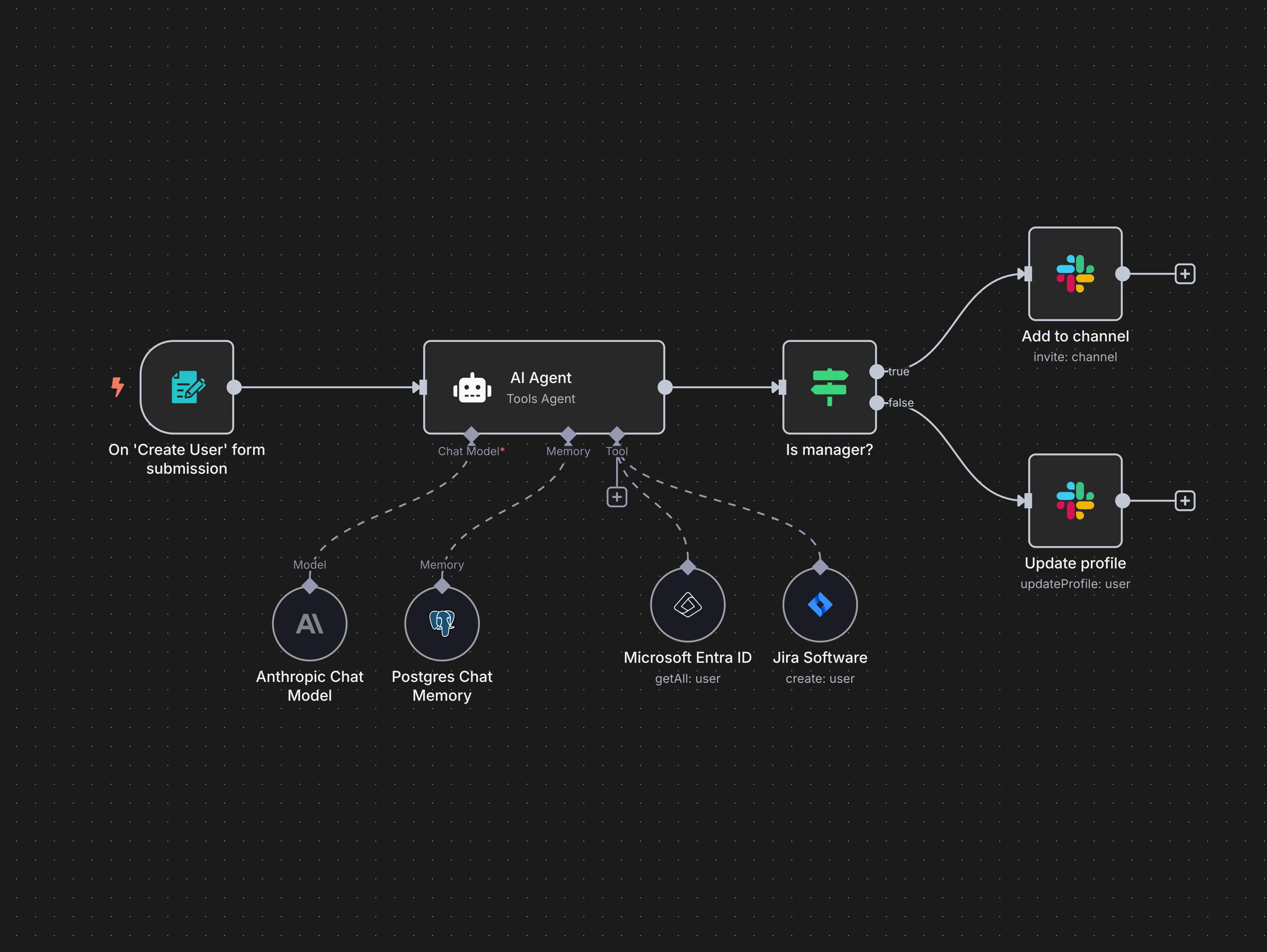
…and then pass that data through a workflow made up of multiple steps. These steps can include third-party integrations, conditional logic, or even your own custom code.
And the use cases? Practically endless.
Real-World Automation Examples
Here are just a few things you can do with n8n:
- Developers: Trigger a workflow when a GitHub PR is merged, build a Docker image, and notify your team on Discord.
- YouTubers: Automatically share your videos across all social media platforms the moment you upload.
- IoT enthusiasts: Sound an alarm when a smart camera detects law enforcement near your compound.
- Degenerate gamblers: Scrape football stats, analyze them with AI, and get betting suggestions for next week.
The wild part?
All of this can be done without writing a single line of code.
Instead of code, you build workflows visually using a flowchart-style editor. The logic is so clear that even non-technical users can understand and use it.
Getting Started with n8n in Seconds
Here’s the crazy part: you can unlock all this power in about five seconds.
Just run this command in your terminal:
npx n8n
A few moments later, you’ll be greeted by a clean, beautiful UI where you can start building automation workflows immediately.
(Yes, the UI is built with Vue.js.)
You can experiment locally, but if you’re serious about automation, you’ll want to host it on a real server.
Hosting Your Own Private Automation Server
For a professional setup, hosting n8n on a Linux VPS is the way to go.
Instead of manually installing everything, you can use a pre-built VPS template that comes with:
- Ubuntu as the operating system
- n8n installed and ready to use
Choose a plan for about $5 per month, set a password, and you’re live.
A few minutes later, your VPS dashboard is ready, and you can access n8n directly—no SSH required.
Click the button, and boom: your private automation system is online.
Exploring n8n Templates
Once inside, the first thing worth checking out is the templates.
For example, there are workflows that:
- Generate AI viral videos
- Post content automatically to social media
- Connect multiple AI tools in one pipeline
Since workflows are JSON-based, you can either download them or import templates directly into your own n8n instance.
But let’s skip the crazy stuff and build something simple from scratch.
Building Your First Automation Workflow
When creating a new workflow, the first thing you add is a trigger.
This could be:
- Manual
- Scheduled
- Or tied to a third-party app
n8n supports hundreds of integrations, and in this case, let’s use Telegram.
The goal?
Trigger a workflow every time my wife sends me a message.
Once configured, any incoming message becomes data that we can process however we want.
Adding Logic and AI to the Workflow
From here, things get interesting.
We can:
- Analyze the message with AI
- Trigger actions in other apps
- Add conditional logic, just like in real code
For example, let’s add an IF condition.
If my wife sends a certain emoji, I know I’ve done something really wrong. Using a simple “contains” string condition, we can detect that emoji and trigger a special branch in the workflow.
Automating Damage Control (Flowers + Apology)
Step one in resolving a domestic dispute?
Order flowers.
There’s no built-in flower delivery integration (as far as I know), but n8n lets you:
- Run custom code
- Call any third-party API
So we’ll connect to a flower delivery API and place an order for immediate delivery.
But that’s not enough.
We also need an apology letter.
Since I didn’t even read the message, we’ll let AI handle that too.
Using an AI agent node, we can:
- Write a custom apology prompt
- Dynamically include my wife’s message
- Choose any AI model we want
- Provide memory and tool context
Now we have a perfectly generated apology letter.
Public Apologies and Record Keeping
Next, we need to send the apology.
I could send it privately on Telegram—but why not show the world what a great husband I am by tweeting it publicly on X?
That’s obviously the best way to resolve a domestic dispute.
Just to be safe, we’ll also log the entire interaction in Google Sheets. You never know when that data might come in handy—especially during future divorce proceedings.
Final Thoughts
And this is just scratching the surface.
n8n isn’t just a fun automation toy—it’s powerful enough to run entire software-as-a-service businesses, automate operations, and eliminate hours of repetitive work from your life.
If you care about saving time, owning your tools, and building smarter systems, n8n is something you absolutely need to know about.
Lost time may never be found again—but with automation, you can make sure it never gets lost in the first place.